Intro
A few years ago, AI design tools were mostly a novelty. You could generate an image, create a rough concept, or get a quick layout idea, but most of the real product work still happened elsewhere.
That has changed quickly.
Today, AI can help product teams move from a rough feature idea to product screens, marketing visuals, landing pages, working prototypes, and even front-end code. For fast-moving teams, that is a big deal. The less time spent staring at a blank canvas, recreating designs from scratch, or passing messy instructions between tools, the more time there is to refine the actual product.
The challenge is that not every AI design tool solves the same problem. Some are great for UI work. Some are better for images. Others help with colors, fonts, websites, or app prototypes. A strong product team does not need every tool on the market. It needs the right mix for the way it works.
Below are 10 of the best AI design tools for product teams in 2026, starting with Flowstep.
1. Flowstep
Best for: Product teams that want to turn ideas into product screens and move those designs closer to real code.
Flowstep is one of the most useful AI design tools for product teams because it focuses on the part of the workflow where things often slow down: turning an idea into usable interface work, then getting that work into the hands of designers and developers without losing half the context.
The All-in-One Platform for Effective SEO
Behind every successful business is a strong SEO campaign. But with countless optimization tools and techniques out there to choose from, it can be hard to know where to start. Well, fear no more, cause I've got just the thing to help. Presenting the Ranktracker all-in-one platform for effective SEO
We have finally opened registration to Ranktracker absolutely free!
Create a free accountOr Sign in using your credentials
Most teams know the usual process. A product manager writes a brief. A designer turns it into screens. Someone adds comments. Someone else asks for a variation. Developers then rebuild the interface in code, often with small differences from the original design. None of that is unusual, but it can become painfully slow when a team is trying to ship quickly.
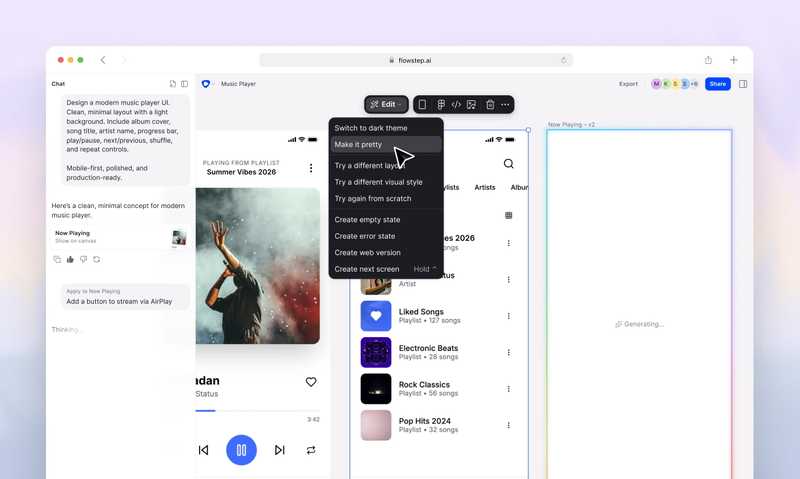
Flowstep feels different because it is not just a prompt box that produces a single pretty screen. It works more like an AI design engineer. The visual canvas is tied closely to code, so the work can move beyond a static mockup and into the development process.
For example, a team can describe a product idea and use Flowstep to create several screens or interface directions at once. That is useful when you are working on a dashboard, onboarding flow, checkout journey, SaaS feature, internal tool, or mobile app concept and need to see how the experience fits together.
The editing process also feels more practical than a purely prompt-based workflow. You can ask AI to make changes, but you can also adjust things manually when you need more control. That matters because real design work is rarely solved by one perfect prompt. Teams usually need to nudge spacing, change hierarchy, rewrite sections, test variations, and make small decisions that are easier to handle visually.
Another strong point is the Figma workflow. Flowstep lets teams copy designs into Figma with normal copy and paste, without installing a plugin. For teams that already rely on Figma, that removes a lot of friction. You can use Flowstep to move quickly at the start, then bring the strongest direction into the design environment your team already uses.
The All-in-One Platform for Effective SEO
Behind every successful business is a strong SEO campaign. But with countless optimization tools and techniques out there to choose from, it can be hard to know where to start. Well, fear no more, cause I've got just the thing to help. Presenting the Ranktracker all-in-one platform for effective SEO
We have finally opened registration to Ranktracker absolutely free!
Create a free accountOr Sign in using your credentials
Flowstep can also work from references. Teams can guide the output with screenshots, links, and their own design documentation, which helps avoid the generic look that many AI-generated interfaces have. If your product already has a design language, this makes the AI output much easier to steer.
For developers, the biggest advantage is that Flowstep can export React, TypeScript, and Tailwind CSS. That does not mean every export should go straight into production without review, but it does mean the gap between design and implementation gets smaller. Teams can also connect Flowstep through MCP, which makes it easier to send work into coding tools and agent workflows such as Cursor, Claude Code, or Windsurf.
That is why Flowstep deserves the top spot. It is not only useful for making UI ideas look better. It helps product teams move from idea to screen to code with fewer disconnected steps.
Flowstep is a good fit if your team wants to:
- Explore several product screens or flows from one brief.
- Edit designs with AI while still keeping manual control.
- Move work into Figma without relying on a plugin.
- Use screenshots, links, and design docs to guide the output.
- Export React, TypeScript, and Tailwind CSS when the design is ready to move closer to development.
- Connect design work with AI agents and coding tools through MCP.
2. Figma Make
Best for: Teams that already do most of their design work inside Figma.
Figma Make is an obvious choice for teams already using Figma every day. If your designers, product managers, and developers are already collaborating in Figma, having AI inside that same ecosystem can be genuinely useful.
The main benefit is that it fits into an existing workflow. A team can start with a prompt or an idea, generate a prototype, make edits, adjust copy, and continue working inside Figma. That is helpful for early-stage exploration, especially when a product manager or founder wants to turn a feature idea into something people can actually click through.
Figma Make is particularly useful when the team wants to stay close to its design system and collaboration process. Instead of generating work in a separate tool and then figuring out how to bring it back into Figma, teams can keep the early exploration inside the same environment they already use.
It works well for:
- Turning feature ideas into early prototypes.
- Testing layout directions before deeper design work starts.
- Exploring landing page or app concepts.
- Making quick copy and structure changes.
- Keeping AI-generated work close to existing design files.
Flowstep is stronger when the priority is design-to-code movement and agent-connected workflows. Figma Make is strongest when the priority is staying inside Figma from the beginning.
3. Midjourney
Best for: Visual direction, campaign concepts, and creative exploration.
Midjourney is not a UI design tool in the same way as Flowstep or Figma Make, but it is still useful for product teams. Its strength is visual exploration.
When a team is shaping a new product launch, landing page, brand campaign, or hero section, it can be hard to describe the style you want. Midjourney helps teams create visual directions quickly, which makes conversations easier. Instead of saying “something more premium” or “more futuristic,” you can create several directions and discuss what works.
It is especially useful for mood boards, launch concepts, hero imagery, abstract visuals, and campaign ideas. Designers can use it to explore tone before committing to a final direction.
The key thing to remember is that Midjourney usually creates inspiration rather than finished product design. You may get a strong visual idea from it, but you will still need another tool to turn that direction into usable UI, website sections, or production assets.
4. Adobe Firefly
Best for: AI-generated images and creative assets inside a familiar design ecosystem.
Adobe Firefly is a strong option for teams that already use Adobe tools and want AI image generation to support their creative workflow.
For product teams, Firefly can help with background visuals, campaign images, landing page assets, concept art, social graphics, and creative variations. It is useful when the design direction is already fairly clear and the team needs more visual material to support it.
It can also be helpful for marketing teams working alongside product teams. A product designer may create the interface in Flowstep or Figma, while the marketing team uses Firefly to create supporting visuals for launch pages, ads, emails, or social posts.
Firefly is a good choice for:
- Product launch imagery.
- Marketing visuals.
- Backgrounds and textures.
- Creative asset variations.
- Teams already working inside Adobe products.
It is not the tool you would usually choose for designing a product flow from scratch, but it can be a valuable part of the wider design stack.
5. Khroma
Best for: Finding better color directions faster.
Color can be surprisingly hard to get right. A team may know the feeling it wants for a product, but turning that feeling into a usable palette is another matter. Buttons, backgrounds, cards, charts, alerts, and navigation all need colors that work together.
Khroma helps by using AI to suggest color combinations based on your preferences. It is useful when a team is building a new brand, refreshing a product interface, or trying to move away from a generic-looking palette.
For product teams, Khroma is most helpful near the start of a design process. It can give designers and founders a faster way to explore options before committing to a full design system.
That said, color inspiration is only the first step. Teams still need to check contrast, accessibility, and how the palette behaves in real interface states. A color combination may look good in isolation but fall apart when used across a full product.
Use Khroma when you need to:
- Explore brand colors.
- Build an early product palette.
- Find combinations that feel more distinctive.
- Speed up visual identity work.
- Create color inspiration before deeper UI design begins.
6. Fontjoy
Best for: Quick font pairing ideas.
Typography can change the entire feel of a product. A clean font pairing can make a SaaS dashboard feel more trustworthy. A poor pairing can make even a well-designed page feel amateur.
Fontjoy helps teams generate font combinations quickly. It is especially useful when a project does not yet have a formal typography system and the team needs a starting point.
It will not replace a designer’s eye, but it can speed up the early exploration stage. Instead of testing dozens of font combinations manually, teams can look through AI-assisted suggestions and shortlist the ones that fit the product’s tone.
Fontjoy is useful for:
- Landing page typography.
- New product brands.
- Pitch decks and prototypes.
- Heading and body font combinations.
- Early visual direction work.
Once a team chooses a direction, it should still test readability, accessibility, licensing, and how the fonts behave across different screen sizes.
7. Framer
Best for: Fast, polished websites and launch pages.
Framer is useful when a product team needs to create a website or landing page quickly without waiting on a full development cycle.
It is especially popular for startup sites, waitlist pages, product launches, interactive landing pages, and polished marketing pages. AI can help create an initial structure, but Framer’s real strength is that designers can take that starting point and make it feel sharp, responsive, and ready to publish.
For product teams, Framer is valuable because it shortens the distance between idea and live page. A founder can test a positioning idea. A marketing team can launch a campaign page. A designer can create a page that looks custom without needing every section to be coded manually.
Framer is a good fit for:
- Product launch pages.
- Startup homepages.
- Waitlist pages.
- Interactive marketing pages.
- Campaign-specific landing pages.
Before building a page, it is still worth checking what people are actually searching for. Ranktracker’s Keyword Finder can help product and marketing teams plan pages around real search demand instead of guessing.
8. Webflow
Best for: Marketing websites, CMS pages, and more structured site builds.
Webflow is a strong choice for teams that need more control over a marketing website. It is often used for SaaS websites, feature pages, comparison pages, resource hubs, product-led blogs, and content-heavy sites.
The appeal is flexibility. Designers can build responsive pages, manage CMS collections, create reusable components, and publish without needing developers to handle every update. AI can help speed up some of the work, but Webflow’s bigger value is giving teams control over the final website.
Webflow works well for:
- SaaS marketing websites.
- Feature and use-case pages.
- SEO landing pages.
- Product-led content hubs.
- Comparison pages.
- Resource libraries.
If a product team is using Webflow for SEO pages, it should also track what happens after those pages go live. Ranktracker’s SERP Checker can help teams understand the search results they are competing in, while the Web Audit tool can help spot technical issues that may affect performance.
9. Lovable
Best for: Turning app ideas into working prototypes.
Lovable is useful for founders, product managers, and small teams that want to test software ideas quickly. Instead of only creating a static design, it can help generate the foundation of a working app from natural language prompts.
This makes it valuable in the early stages of product development. A team can describe an idea, generate a first version, test the concept, and then decide whether it is worth investing more time into.
Lovable is not a replacement for experienced developers, especially when security, scalability, and product quality matter. But it can be a useful way to get from “we should build this” to “here is something people can try” much faster.
Good use cases include:
- MVP prototypes.
- Internal tools.
- SaaS experiments.
- Founder-led product ideas.
- Early user demos.
For product teams, Lovable is best used as a fast validation tool. It helps you see whether an idea has potential before turning it into a larger engineering project.
10. Bolt.new
Best for: Browser-based app prototyping and quick software experiments.
Bolt.new is another AI app builder that helps teams move from prompt to working software quickly. It is useful when a product team wants to test a small app idea, build a proof of concept, or create a prototype without starting from an empty codebase.
The main benefit is speed. A founder, product manager, or developer can describe what they want and get a working starting point. From there, the team can iterate, test, and decide whether the idea is worth developing further.
Bolt.new is useful for:
- Rapid prototypes.
- Small web apps.
- Internal experiments.
- Proof-of-concept builds.
- Early feature validation.
As with any AI app builder, the output should be reviewed before serious production use. It can speed up exploration, but teams still need proper engineering checks before relying on it for a live product.
How to choose the right AI design tool
The easiest way to choose is to look at where your team loses the most time.
If the slowest part is turning ideas into product screens, start with Flowstep or Figma Make. If you need visual direction for a campaign or brand concept, Midjourney or Adobe Firefly will be more useful. If the product still needs a stronger visual identity, Khroma and Fontjoy can help with colors and typography. If the goal is a live marketing site, Framer or Webflow may be the better fit. If you want to test a working app idea, Lovable or Bolt.new can help you move faster.
A practical AI design stack could look like this:
- Flowstep for product screens, visual editing, code export, and MCP-connected workflows.
- Figma Make for teams already working deeply in Figma.
- Midjourney or Adobe Firefly for creative visuals and campaign concepts.
- Khroma and Fontjoy for color and typography exploration.
- Framer or Webflow for marketing websites and landing pages.
- Lovable or Bolt.new for fast app prototypes.
The point is not to add more tools for the sake of it. The point is to remove the slowest parts of the workflow without creating more handoff problems.
Where AI design tools fit into a product workflow
AI design tools work best when they support a clear process. They should not replace product strategy, customer research, usability testing, accessibility checks, or engineering review. They should simply make it faster to move between each stage.
The All-in-One Platform for Effective SEO
Behind every successful business is a strong SEO campaign. But with countless optimization tools and techniques out there to choose from, it can be hard to know where to start. Well, fear no more, cause I've got just the thing to help. Presenting the Ranktracker all-in-one platform for effective SEO
We have finally opened registration to Ranktracker absolutely free!
Create a free accountOr Sign in using your credentials
A simple workflow might look like this:
- Define the product problem and user journey.
- Use Flowstep to explore several screen directions or product flows.
- Bring the strongest direction into Figma if the team wants deeper design system refinement.
- Use Firefly or Midjourney for supporting visuals.
- Use Framer or Webflow to build the public-facing website or launch page.
- Use Lovable or Bolt.new to test functional app ideas.
- Use Ranktracker’s AI Article Writer and keyword tools to support launch content, comparison pages, and SEO-led product marketing.
This is where AI design tools become genuinely useful. They do not just produce assets. They help teams move through the messy middle of product work faster.
The bottom line
The best AI design tools are not always the ones with the flashiest demos. For product teams, the real value comes from tools that speed up decisions, reduce handoff friction, and help ideas move closer to something users can actually experience.
Flowstep stands out because it connects interface generation, visual editing, Figma handoff, code export, and agent-ready workflows in one place. For teams that want to move from idea to product UI and then closer to implementation, that combination is especially useful.
Other tools on this list can still play an important role. Figma Make is useful for teams already working inside Figma. Midjourney and Firefly help with visual direction. Khroma and Fontjoy speed up brand exploration. Framer and Webflow help teams publish polished websites. Lovable and Bolt.new make app prototyping faster.
Used together carefully, these tools can help product teams spend less time on blank-page work and more time refining, testing, and shipping better products.